

Earn the inbox: what email deliverability actually looks like in 2026
Deliverability isn't a technical problem you solve once. It lives in every part of your email program, and it's watching you back.


Say "deliverability" in a room of email marketers and watch what happens. People shut down. Some cry. Some turn off their entire programs. Because someone told them they had a deliverability issue, and that phrase alone was enough to send them into a spiral.
Israa Alrawi has seen all of it. Founder of The Winbox and email deliverability and strategy specialist, she did not come up through traditional marketing. She was rejected by Zapier approximately 100 times, said "screw it," built her own cat accessories store, and found a mentor in affiliate marketing ("if you know anything about affiliate marketing, it's pretty shady") who taught her the technical side of email from the ground up. She is, by her own admission, safe from being kidnapped because she will talk about deliverability all day.
At Unspam 2026, she walked through the entire email program and showed exactly where deliverability lives inside it. If you have ever wondered how to improve email deliverability without blowing up your program in the process, this is the walkthrough.
The through line: deliverability is not a setup task. It lives everywhere.
The era of best practices is over
There used to be a version of email marketing where authentication was handled by your technical team once, and then everyone forgot about it. You built beautiful emails, hit send, and watched revenue appear.
That version is gone.
Gmail, Yahoo, and Outlook are no longer offering suggestions. They are setting requirements. And your subscribers are setting requirements too. The mailbox providers are watching you. Your subscribers are watching you. You are in the middle, trying to balance it all. The good news is that most of this is followable. Rules exist. You just have to follow them, monitor them, and stop pretending they go away after setup.
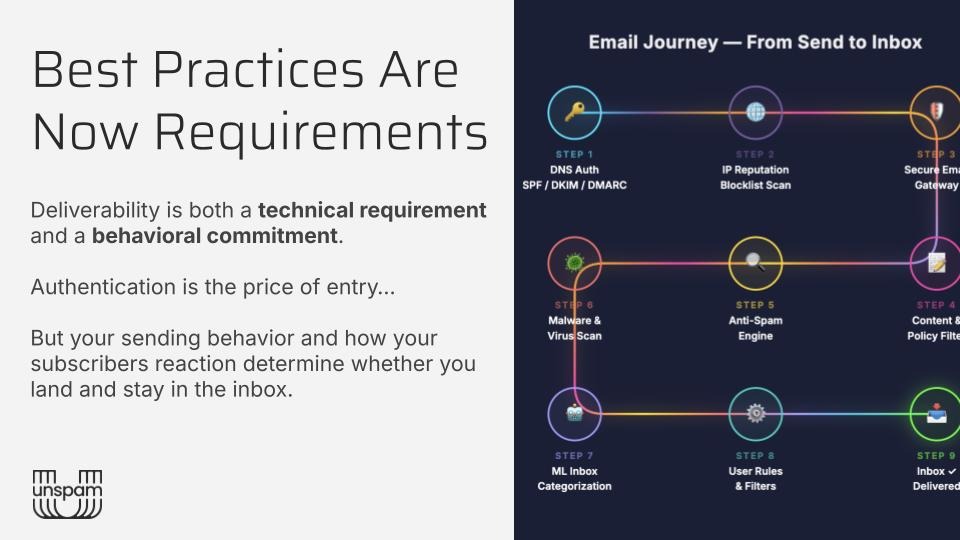
Part 1: Your digital identity (a.k.a. authentication)
Authentication is the price of entry. It does not guarantee inbox placement. But without it, you won't get in at all. Think of it like showing up to a venue. Authentication is your ID at the door. It proves you are who you say you are. What happens after you get in is a different story.
There are three DNS records every sender needs. None of them is optional.
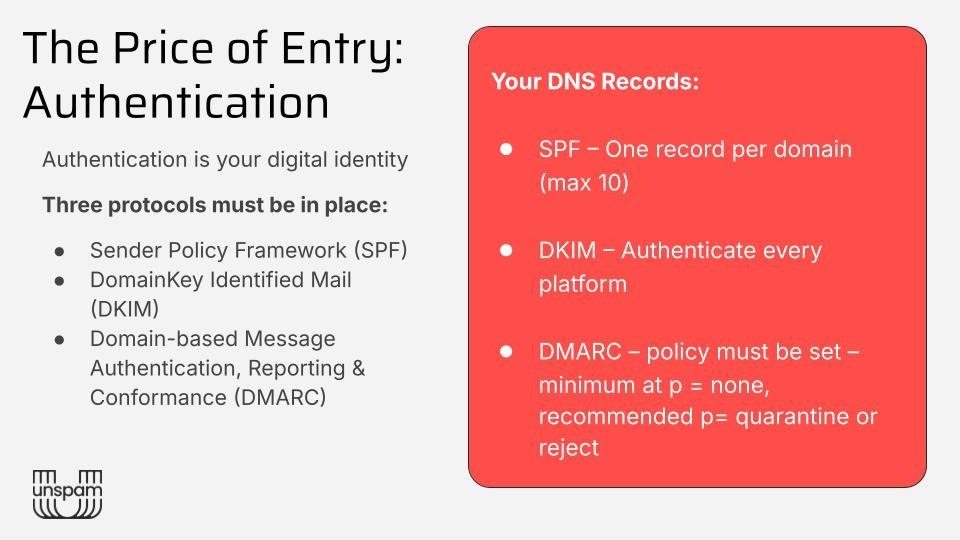
SPF
SPF gives servers permission to send on your behalf. One record per domain. Keep your lookup count under 10. After 10, the record gets truncated, the check can fail, and your email lands in spam or gets blocked entirely.
Most programs accumulate entries over the years and never clean them up. Someone adds a new platform, forgets to remove the old one, and adds another. The list grows. Nobody looks at it. Check yours.
DKIM
DKIM works like a sealed envelope. It is a signature attached to your email that gets matched against a record in your DNS. If it matches, the mailbox provider knows the message arrived unaltered.
You need a separate DKIM record for every platform you send from. Klaviyo has one. Google Workspace has one. Each platform needs its own domain key.
DMARC
DMARC used to be optional. Then in 2024, Gmail came in and said: you need at least a policy of 'none." Everyone set policy none and moved on.
Here is the problem: "none" is a monitoring policy, not an enforcement policy. Israa is seeing senders with policy none still landing in spam. The path forward is to move to quarantine first, then work toward rejection. Quarantine lets the email through but routes unauthorized messages to the spam folder. Reject blocks them entirely. Most DNS hosting platforms let you update your DMARC record directly, and your ESP documentation will usually walk you through the exact syntax. If you have significant sending infrastructure, reject is where you eventually want to be.
One more thing: DMARC sends you reports. You are supposed to read them. They show you what is aligning with your SPF and DKIM, and who might be spoofing your domain. Israa had a client who ignored their DMARC reports, got hit by a bot attack, and took down their entire Cloudflare infrastructure. The data was there the whole time.
What's in it for you: If your open rate drops from 60% to 10% overnight, this is the first place to look. Hard spam placement almost always traces back to authentication.
Part 2: What your subscribers actually see
Once authentication checks out, there is a second layer of identity: your email headers. Four things matter.
- From name. Gmail now has formal rules. Your from name must be your brand name or "Name from Brand." No email addresses, no emojis, no "SUMMER SALE EXCLUSIVE" where your business name should be. If your welcome email comes from "Brand Name" and your campaigns start coming from "Daniel," your subscribers have no idea who Daniel is. Confusion kills trust before the open happens.
- From email. Must be domain-based. Not a Gmail address, not a Yahoo address. A real business domain. This is one of the fastest fixes available in deliverability. Switch it, and things start moving.
- Subject lines. Emojis are not banned, but they are monitored. Limit to two, place them after your live text, and do not use them on every send. And skip deception entirely. Israa received an email on April 2nd that used every subject line trick in existence. The sender reported it as their highest-revenue send ever. It also generated an 8% spam complaint rate. Not a trade worth making.
- BIMI. The small brand icon that appears next to your name in the inbox. Apple Branded Mail is free and works within Apple Mail. BIMI certification through a VMC is paid, shows up in Gmail and other providers, and does not require a reject-level DMARC policy. Valley Mail recently published a case study with a global food brand that saw a 18% increase in engagement after implementing BIMI.
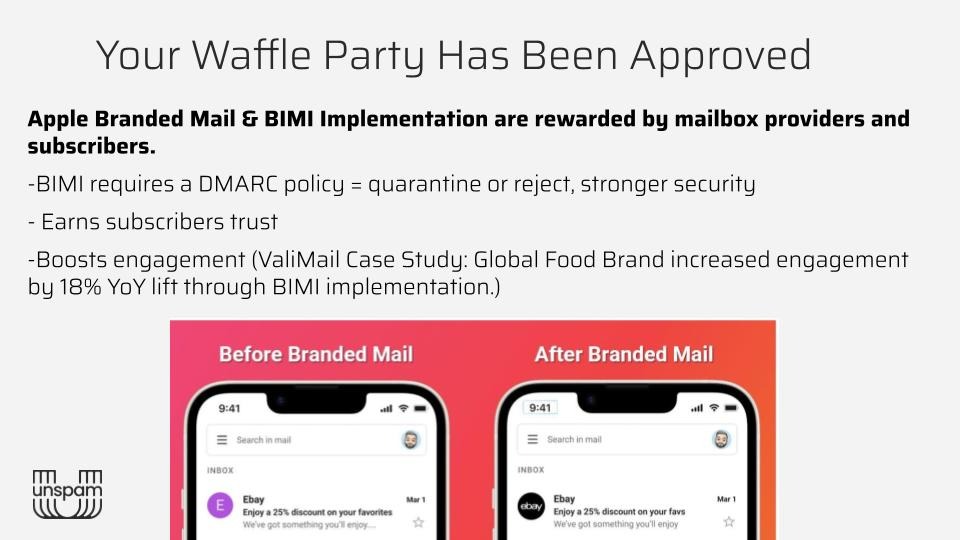
What's in it for you: Headers are the first impression before the open. Get them right, and you are building recognition and trust before anyone reads a single word of your subject line.
Part 3: Your behavior as a sender
Authentication and headers are the technical side. Now comes the human side: what you actually do and how it shapes how mailbox providers see you over time.
Traffic quality over traffic quantity
Three rules Israa does not negotiate on: do not buy lists, do not scrape lists, and do not use warming tools that use bots. Mailbox providers are sophisticated enough to recognize manufactured growth. It flags you, damages your reputation, and costs more to fix than it ever generated.
Lower-quality traffic is trickier because it does not always look like a problem up front. Giveaways, co-promotions, and collaborations attract subscribers who may be interested in your partner, not in you. That traffic needs to flow through a nurture and be qualified before it reaches your main campaign list. Pull out the people who engage and buy. The rest: suppress, reengage, or let go.
Ideal traffic is people who opted in because they specifically wanted your emails. That is your real list.
Automations protect your reputation before you need it
When Israa sets up a new program from scratch, she runs two to three weeks of automations before sending a single campaign. You want goodwill in the bank with mailbox providers before volume starts pushing through.
The first email a subscriber receives has the highest open and click rates your program will ever generate from that person. Use it for something that matters. If you want a preference center to actually work, put it there, not buried in a campaign footer three months later. At the start, when someone is paying attention, tell them you do not want to overwhelm them and give them control. Trust goes up. Unsubscribes go down.
One warning: build automations like a tree, not a bush. Israa has seen subscribers receive 15 emails in 24 hours because every automation was firing without filtering or understanding of the subscriber journey. Map it out.
What's in it for you: Automations filter unengaged subscribers out early, generate your strongest engagement signals, and give mailbox providers a reason to trust you before your campaigns even start.
Part 4: List segmentation
Two extremes. Israa has seen both. Over-segmenters panic upon hearing "deliverability" and delete everyone who hasn't opened in 30 days. Technically defensible. Strategically questionable if your business depends on email revenue.
Under-segmenters are chasing list size as a KPI. They grew from 5,000 to 100,000, and only 2,000 people are actually opening anything. The right question is not "how many days should my window be?" It is: what does your subscriber-to-product lifecycle actually look like? A replenishment product might cycle in 30 days. A couch cycles in two years. Nobody is buying another couch next month. Your segmentation logic should reflect how your customers actually buy.
The distinction that changes everything: customers and email-engaged subscribers are not the same list. Israa has a client who has spent $70,000 with a brand and has not opened an email in two years. They walk into the store and buy. Mailbox providers do not see loyalty spend. They see open signals. Send to the people who open. Her approach: go broad on inclusions, apply exclusions where needed. If Gmail, Yahoo, and Outlook are all healthy but AOL is sitting at 10% open rates, do not cut everyone down to a 30-day segment. Shrink the AOL segment and fix that specific reputation while leaving everyone else alone. Segment by mailbox provider, not just by recency window.
Read your open rates broken down by mailbox provider, not as a total. The aggregate number masks what is actually happening. And sunset your list. Gmail converts inactive addresses into spam traps after roughly two years. Build it into your program as an automated process.
Part 5: Content in an AI-first inbox
Your first reader is no longer a person. It is AI. Before a subscriber opens your email, it has already been summarized and evaluated. Write for clarity. Write to be understood on the first pass. Clever is a liability here. Clear is the asset.
On design: images should add to the email, not hold it together. If the images disappear, the email should still work. Live text carries the message. Alt text should be descriptive enough to stand on its own. Turn off your images and look at your email. If it collapses, that is an accessibility problem and a deliverability problem at the same time.
Keep links clean, minimal, and checked regularly. Three to five, domain-based wherever possible. Social links break constantly, and most people never notice because they saved a template block years ago and never looked at it again. Broken links are a signal to mailbox providers.
Spam word lists are mostly obsolete. Mailbox providers now read tone and intent across the whole email. What does matter is consistency: the language you use in your opt-in should carry through to your campaigns. If your opt-in was about community and your campaigns are pure sales, that gap erodes relevance. Gmail is built on relevance. Enough erosion, and you end up in spam regardless of how clean your authentication is.
What's in it for you: Clarity drives engagement. Engagement is the signal that keeps you in the inbox. It starts at the content level.
Part 6: Monitoring your vitals
Three categories of signals. All of them are telling you something, and none of them are worth panicking over if you know how to read them.
Opens and clicks are trends, not snapshots. A 65% open rate that drifts to 50%, then 40%, means something is eroding in your program. Investigate which mailbox provider is pulling the number down before you do anything else. A 60% rate that becomes 10% on the very next send is a different problem entirely: go back to your authentication records immediately, because that kind of drop almost always traces back there.
Bounces and spam complaints are diagnostic tools, not emergencies. Do not exclude soft bounces just because they bounced once or twice. Your ESP already handles retries, and mass-excluding soft bounces throws away addresses that would have come back. Hard bounces at the automation level, though, are your early warning system. High hard bounces on your first email mean your incoming traffic has a quality problem: bots, spam traps, or low-intent signups. Catch it there before it spreads.
Gmail spam complaints deserve a separate note because they are invisible inside your ESP or CRM. Gmail does not send feedback loops back to your platform, so the "zero spam complaints" number you're seeing isn't zero. It is unknown. Sign up for Google Postmaster, set up your domain, and check it out. The newer version also surfaces content flags and rate-limiting signals. The data exists. It is just not where most people think to look.
Unsubscribes do not directly affect deliverability, but they serve as a relevance signal. If people are leaving faster than usual, your content has drifted from what they signed up for. That drift, left unchecked, eventually shows up in your inbox placement.
What's in it for you: The earlier you catch a trend moving in the wrong direction, the cheaper and faster it is to fix. Monitoring is not a monthly audit. It is what makes everything else sustainable.
The only thing Israa wants you to leave with
Deliverability is not a setup task. It lives in authentication, traffic quality, automation structure, list segmentation, content strategy, and ongoing monitoring. It is always on. The mailbox providers are always watching. Your subscribers are always watching. The effort you put into the program is the inbox you get out of it.
Three things: authenticate and monitor your records. Earn permission and qualify your traffic. Stay relevant to the people who signed up.
Send good emails. Really good ones.
Articles to whet your whistle



Subscribe to our newsletter.
Dive into the world of unmatched copywriting mastery, handpicked articles, and insider tips & tricks that elevate your writing game. Subscribe now for your weekly dose of inspiration and expertise.